
10 Best AI Tools in 2026 (Tested — and What the Free Plans Really Give You)
Updated 27 October 2026 · 10 tools tested · ~12 minutes read
Most “best AI tools” lists are written by people who signed up, clicked around for ten minutes, and copied the pricing page. This one is different: we used every tool on this list for real work — drafting, coding, research, image and video generation — and recorded what the free plan actually allows before it pushes you to pay.
Thank you for reading this post, don't forget to subscribe!The short version: there is no single best AI tool in 2026. There are four tools that cover most of what people need, and six specialists that are dramatically better at one job than any general assistant. Here’s the map.
Quick verdict
- 🏆 Best all-round assistant: ChatGPT — broadest feature set, best ecosystem (GPT-6, Slides, deep research).
- ✍️ Best for writing and coding: Claude — Opus 5.5 tops the coding leaderboard and writes the most natural long-form prose.
- 🆓 Best free tier: Google Gemini — Gemini 4 Argon, huge context window and the most generous free limits.
- 🔎 Best for research: Perplexity — cited answers, fastest path from question to verifiable source.
- 🎨 Best specialist: ElevenLabs for voice, Suno for music, Veo for video, NotebookLM for studying from your own documents.
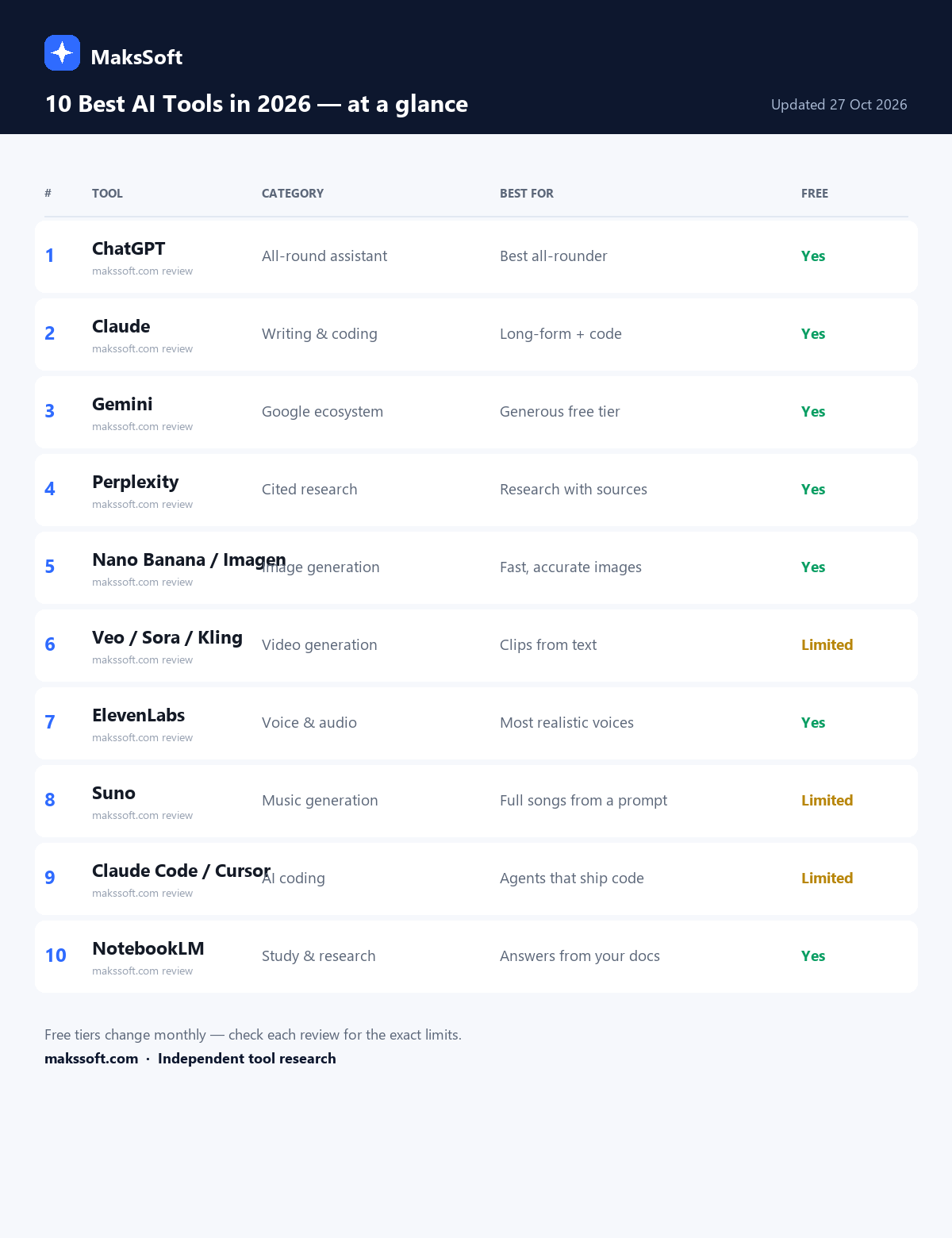
The 10 tools at a glance
| # | Tool | Category | Best for | Free plan | Paid from |
|---|---|---|---|---|---|
| 1 | ChatGPT | All-round assistant | Daily work, drafting, analysis | Yes, capped | $20/mo |
| 2 | Claude | Writing + coding | Long documents, serious code | Yes, tight caps | $20/mo |
| 3 | Gemini | Google ecosystem | Docs/Gmail users, huge context | Yes, generous | $20/mo |
| 4 | Perplexity | Research | Cited answers | Yes, limited Pro searches | $20/mo |
| 5 | Gemini / Nano Banana 2 | Image generation | Fast, text-accurate images | Yes, daily limit | Bundled |
| 6 | Veo 3.1 (Google Flow) | Video generation | Cinematic clips with audio | Limited credits | $19.99/mo |
| 7 | ElevenLabs | Voice / audio | Most realistic AI voices | Yes, limited chars | $5/mo |
| 8 | Suno | Music | Full songs from a prompt | Limited daily credits | $10/mo |
| 9 | Claude Code / Cursor | AI coding agents | Shipping real code | Limited | $20/mo |
| 10 | NotebookLM | Study / research | Answers from your own docs | Yes, very generous | $19.99/mo |
1. ChatGPT — best all-round AI assistant
Category: general assistant · Free plan: yes, with usage caps · Paid: from $20/month
ChatGPT is still the default starting point, and in 2026 that’s justified by breadth rather than raw model quality. The current lineup (GPT-6 and its reasoning variants) is excellent at the everyday mix: rewriting an email, summarising a report, planning a project, analysing a spreadsheet, debugging a snippet. Add Slides for presentations, deep research for multi-source reports, and Work for team spaces, and it covers more workflows than any rival.
Why it’s on the list: it’s the only tool most people need to learn first. If you’re going to pay for one AI subscription, this is the safest choice because it never leaves a giant hole in your workflow.
What the free plan actually gives you: access to capable models with usage caps that tighten at peak times; the best models are limited to paid tiers. You can do real work for free, but not all day, and not on the frontier models.
The catch: it’s a jack-of-all-trades. For cited research Perplexity is better, for prose Claude is better, for coding agents Claude Code is better.
Pick it if: you want one assistant that handles 80% of everything.
2. Claude — best for writing and coding
Category: writing, long context, coding · Free plan: yes, ~15–40 messages per 5 hours · Paid: from $20/month
Claude has quietly become the professional’s tool. Opus 5.5 leads independent coding leaderboards this month (a coding index of 49.9, ahead of every rival we tracked), and the same model family produces the most natural long-form writing of the big three — fewer stock phrases, better structure, stronger voice retention across a 3,000-word draft.
Anthropic shipped three model updates in about five weeks this autumn (Opus 5.5, Sonnet 5.5, Haiku 5.5), so the paid tiers now cover everything from cheap fast tasks to heavy reasoning.
Why it’s on the list: if your work is words or code, Claude is the best value in AI right now.
What the free plan actually gives you: genuinely capable models, but the tightest message limit of the big three — roughly 15–40 messages per five hours. Enough for one focused editing session per day, not enough for full-time use.
The catch: no image or video generation at all, and the free caps are frustrating if you write all day.
Pick it if: you write for a living, or you’re serious about AI-assisted coding.
3. Google Gemini — the best free AI tool overall
Category: assistant, Workspace, multimodal · Free plan: yes, most generous · Paid: from $20/month
Gemini 4 “Argon” (October 2026) is the reason Google’s assistant now belongs in the top three. The context window is enormous — around a million tokens — and the free tier is the most usable of any frontier assistant: no punishing daily message cap, live web access, and native integration with Docs, Gmail and Drive.
For anyone whose coursework or work already lives in Google’s ecosystem, it’s the path of least resistance. It’s also the best free option for “here are 200 pages, find the contradictions”.
Why it’s on the list: best free tier, best Google integration, best long-context value.
What the free plan actually gives you: the most generous limits in this list, including web access. Advanced models and some agent features sit behind Google AI Pro.
The catch: prose quality is inconsistent on nuanced or creative work, and feature availability varies by country.
Pick it if: you want the strongest free assistant, or you live in Google Docs.
4. Perplexity — best AI research tool
Category: cited research / AI search · Free plan: yes, limited Pro searches · Paid: $20/month
Perplexity doesn’t try to be your writing assistant — it tries to answer questions with sources you can check. Each answer carries numbered citations, and the paid version routes queries across frontier models (OpenAI, Anthropic, Google) to pick the best fit, with a quota of roughly 300+ searches a day.
Accuracy is where it earns its place. In the Tow Center’s 2026 audit of AI news answers, Perplexity had the lowest failure rate of the tools tested (37%, against 60%+ for several rivals). For anything you’ll publish, cite or act on, that matters more than prose style.
Why it’s on the list: it’s the only tool here designed around verifiable evidence.
What the free plan actually gives you: solid answers with citations, but only a handful of deeper Pro searches per day.
The catch: it’s a research engine, not an editor. Draft in another tool.
Pick it if: you write reports, articles or academic work and need real sources.
5. Gemini with Nano Banana 2 — best AI image generator
Category: image generation · Free plan: yes, ~20 images/day · Paid: bundled with Google AI plans
Image generation consolidated fast in 2026. Google’s Nano Banana 2 (the default free image model in Gemini since February) is the pragmatic pick: strong photorealism, unusually good at rendering legible text inside images, and — critically — free at roughly 20 images a day without a credit card.
For heavier professional work, Magnific/Freepik dominates traffic share in the category, and Midjourney still wins on pure aesthetic control. But for blog headers, social graphics and concept mockups, Nano Banana 2 is the best free starting point.
Why it’s on the list: the best balance of quality, free access and text rendering.
What the free plan actually gives you: around 20 images a day, watermarked only in some regions/features — check the export before publishing commercially.
The catch: precise brand consistency across many images still requires paid tools or careful prompt libraries.
Pick it if: you need usable images today without a subscription.
6. Veo 3.1 via Google Flow — best AI video generator
Category: text/image-to-video · Free plan: limited daily credits · Paid: from $19.99/month
AI video crossed the “usable for real work” line in 2026. Google’s Veo 3.1 (available through Flow and AI Studio) produces up to 4K clips with synchronised dialogue, ambient sound and sound effects — the thing that separates it from the silent, uncanny clips of 2024. Kling 3.0/4.0 is the strongest competitor for physics-heavy social clips, and Sora remains excellent for surreal concepts.
Why it’s on the list: it’s the most complete text-to-video package, with audio handled in the same generation.
What the free plan actually gives you: a small daily credit allowance — enough to learn the tool and test prompts, not enough to produce a client video. Free output carries a SynthID watermark.
The catch: generation is slow, credits vanish quickly, and long-form storytelling still needs an editor.
Pick it if: you make ads, social clips or concept videos.
Need to edit what you generate?
See our tested guide: Best Free AI Video Editors in 2026 — https://makssoft.com/best-free-ai-video-editors-2026
7. ElevenLabs — best AI voice generator
Category: voice / audio · Free plan: yes, limited characters · Paid: from $5/month
ElevenLabs is the clearest specialist in this list: if you need a voiceover that doesn’t sound synthetic, nothing else is close. Independent reviews consistently rank it top for realism, with support for 29 languages and voice cloning from short samples. The leaderboard we tracked scores it 9.4/10 — the highest of any tool in its category.
Use it for YouTube narration, course modules, audiobook drafts, podcast intros and localisation. It handles emotion and pacing better than the voice modes bundled into general assistants.
Why it’s on the list: best-in-class realism, and the free tier is enough to judge it properly.
What the free plan actually gives you: a monthly character allowance with attribution required on free output. Commercial rights need a paid plan.
The catch: per-character pricing gets expensive on long-form audio, and cloning raises consent/legal questions you must handle carefully.
Pick it if: voice quality is the product.
8. Suno — best AI music generator
Category: music · Free plan: limited daily credits · Paid: from $10/month
Suno v5.5 writes complete songs — vocals, instrumentation, structure, mixing — from a text prompt, and it’s the tool most creators actually use for background music, jingles and parody tracks. The quality jump in 2026 is real: outputs are release-adjacent rather than demo-grade.
Why it’s on the list: it’s the only music tool here that consistently produces something you’d actually publish.
What the free plan actually gives you: a small daily credit allowance (a few songs), non-commercial use, and no stem downloads.
The catch: free output isn’t licensed for commercial use, and rights around AI music remain murky — read the terms before monetising.
Pick it if: you need original music for content and can work within the licence.
9. Claude Code and Cursor — best AI coding tools
Category: AI coding agents · Free plan: limited / trial · Paid: $20/month
Coding is where AI agents have changed work most. The 2026 pattern is a two-tool stack: Cursor as the AI-native editor (fast inline edits, a built-in PR review agent tuned for low false positives), and Claude Code as the terminal agent that handles multi-file refactors and long autonomous tasks.
Underneath, Claude Opus 5.5 currently leads independent coding benchmarks, which is why so many agent tools route to it. For non-developers, “vibe coding” platforms (v0, Bolt, Lovable, Replit) now produce deployable apps from prompts — useful for prototypes, riskier for production.
Why it’s on the list: the productivity difference is larger here than in any other category.
What the free plan actually gives you: Cursor’s free tier is limited; Claude Code needs a paid Claude plan; GitHub Copilot is free for verified students. Real work needs a subscription.
The catch: agents confidently produce plausible-but-wrong code. Review everything before it ships.
Pick it if: you write software daily.
10. NotebookLM — best AI study and research assistant
Category: source-grounded research · Free plan: yes, very generous · Paid: from $19.99/month
NotebookLM is the sleeper pick of 2026. Upload PDFs, lecture slides, links or notes, and it answers only from those sources — with citations back to the page. It builds study guides, FAQs, timelines and audio overviews, which makes it the best free tool for exam revision, literature reviews and onboarding into a new topic.
The free tier is unusually generous: 100 notebooks, 50 sources per notebook, up to 500,000 words per source, with limits resetting every five hours.
Why it’s on the list: it’s the only major tool built to reduce hallucination by design.
What the free plan actually gives you: enough for an entire semester or a research project. Paid tiers mainly add capacity and advanced sharing.
The catch: it won’t browse the web for you, and its answers are only as good as your uploads.
Pick it if: you study, research, or need to interrogate long documents.
Related: the student stack
We tested the free plans of every tool students actually use: Best AI Tools for Students in 2026 — AI-tools for students]
How we tested
We used each tool on the same three realistic tasks in its category:
- Free-tier reality check — signed up with a fresh account, no card, and recorded exactly where the limits bite (messages, credits, words, characters, resolution, attribution).
- Quality test — a writing task, a research question with verifiable claims, a code task, and an image/video/audio generation where applicable.
- Workflow test — could the output be used without another paid tool? What did we have to fix by hand?
Plan details were checked against official pricing pages and help centres on 27 October 2026. AI free tiers change monthly — verify the limit screen before you commit to a tool.
Which one should you pick?
- One subscription only: ChatGPT ($20). Broadest coverage.
- You write or code for a living: Claude ($20).
- You want the best free assistant: Gemini (free).
- You need sources you can cite: Perplexity ($20).
- You make content: Nano Banana 2 (images, free) + Veo 3.1 (video, $19.99) + ElevenLabs ($5) + Suno ($10).
- You’re a student: NotebookLM (free) + Gemini (free) + Grammarly free — see the full student stack.
FAQ
What is the best AI tool overall in 2026?
ChatGPT is the best overall assistant because it covers the widest range of everyday tasks in one place. Claude is better for writing and coding, Gemini has the best free tier, and Perplexity is better for research — but if you want a single tool, pick ChatGPT.
Which AI tool has the best free plan?
Google Gemini. It has the most generous limits, live web access, and a very large context window without paying. NotebookLM is also exceptional value if your work is document-based.
Are AI tools worth paying for in 2026?
Yes, if you use them daily. The $20/month tiers now include frontier models and features that were $200/month a year ago. Start free, upgrade only the one tool you hit the limits on most often.
What is the best AI tool for research with real sources?
Perplexity. Every answer includes numbered citations you can open and verify, and independent audits rate its accuracy higher than most rivals. Pair it with NotebookLM to work through the papers you download.
Can I use AI tools for free commercially?
Sometimes, but check each licence. Free tiers often restrict commercial use (Suno), require attribution (ElevenLabs), or watermark output (Veo’s SynthID). Paid plans generally grant commercial rights.